Wintotes
A downloadable tool for Windows
Totes
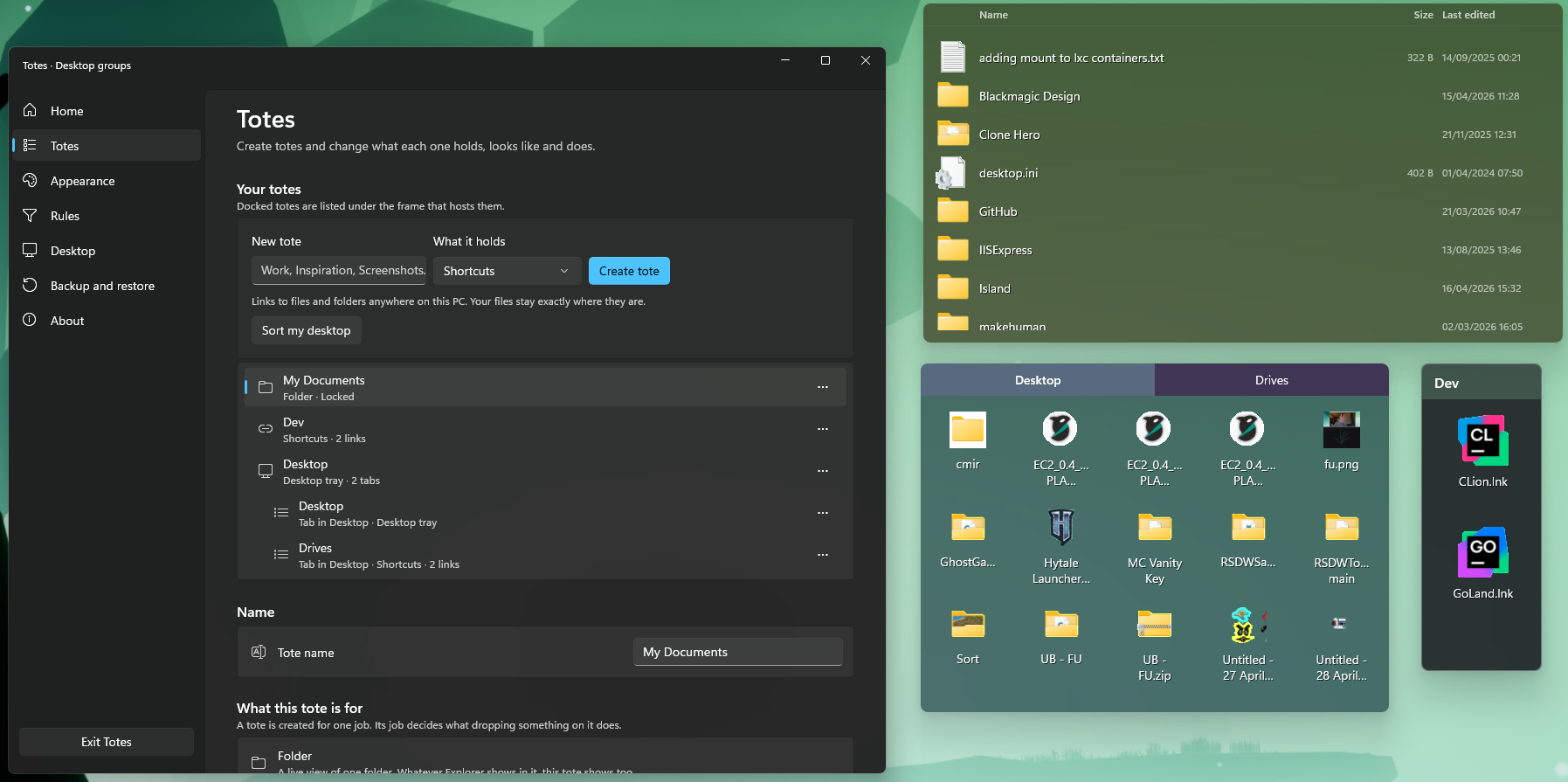
Totes keeps your Windows desktop tidy without taking it over.
Group your files and folders into translucent, resizable frames that sit on the desktop and stay where you put them. Combine them into tabs, point one at a real folder, colour them, roll them up, lock them down. Totes is a native Windows 11 app — no runtime to install, no administrator needed, nothing phoning home.
Three kinds of tote
Every tote is created for a stated purpose, and it tells you what it will do before it does it.
| Kind | What it does |
|---|---|
| Shortcuts | Holds links to files and folders wherever they live. Adding, removing, reordering or moving them between totes never touches anything on disk. |
| Folder portal | A live view of a real folder. Rename something in Explorer and the tote follows. Browse into subfolders and back out again without leaving the frame. |
| Desktop tray | Actually moves items off the desktop into the tote, so each one exists in exactly one place — no duplicates. Close Totes and they go straight back to the desktop; start it again and they return. |
Tabs
- Drag any tote onto another to combine them into one tabbed frame.
- A shortcuts tote and a folder tote can share a frame — each tab keeps its own contents, colour and layout.
- Reorder tabs, or pull one out into a frame of its own.
- Drop files directly onto a tab header to file them there.
Make it yours
- Colour per tote and per tab — presets or any hex value you like.
- Acrylic blur, tint strength, luminosity and background opacity, all independent, so a see-through tote still has readable labels.
- Corner radius from fully square to fully rounded, and an outline you can thicken or switch off.
- Header alignment, font and size — or no header at all, and drag the frame by its body.
- Icon size and spacing, with icons that spread to fill the frame instead of leaving a ragged edge.
- Grid or details view, with Name, Size, Type, Created, Last edited and Location columns you choose per tote.
- Padding and margins for the frame, the header and each item.
Real file handling
Folder totes do genuine Windows file operations, through the same shell interfaces Explorer uses:
- Choose explicitly whether dropped files copy or move — per tote, never guessed.
- Collision-safe naming, a progress strip with a Cancel that works, and Recycle Bin deletion.
- Undo the last file operation from the tote's own menu.
- Filesystem history and layout history are kept separate, so restoring a layout never claims to have reversed a file change.
Rules
- Sort references automatically by extension, name, source folder or modified date.
- Exclusions and priority ordering, plus a destination for anything unmatched.
- Preview every match, with an explanation, before you apply it. Pause the whole rule set any time.
Living on the desktop
- Peek — a configurable shortcut raises every tote for four seconds, then puts your window layering back exactly as it was.
- Roll up a tote to its title bar with a double-click.
- Lock positions so nothing drifts; a locked tote still switches tabs and accepts drops.
- Totes snap to each other and to the edges of your work area.
- Full multi-monitor support: positions are stored per monitor and survive DPI changes, unplugging a display, and plugging it back in.
- Right-click the desktop for Wintotes › New Tote and Wintotes › Settings.
- Keyboard throughout: arrow keys move by the grid's real columns, type a letter to jump, Enter to open, Delete to remove.
- Runs from the notification area. Closing the settings window leaves your totes on the desktop.
Layouts you can't lose
- Save named workspace presets and switch between them.
- Automatic snapshots, plus import and export.
- Importing takes a safety snapshot first.
- Saves are atomic and keep a backup. If a layout file is ever damaged, Totes reports it and leaves the file untouched for recovery rather than overwriting it.
- Everything lives in
%LOCALAPPDATA%\Totes— outside the install folder, so upgrading is never a reset.
Requirements
- Windows 11 x64 (Windows 10 build 19041 and later also works)
- Nothing else — .NET 8 and the Windows App SDK are carried inside the download
Privacy
No telemetry, no accounts, no network access. Your layout is a single JSON file on your own machine.
Download
Click download now to get access to the following files:
Leave a comment
Log in with itch.io to leave a comment.